SSD Buying Guide 2026: NVMe vs SATA, Capacity and Speed
Choose the right SSD in 2026. Compare NVMe and SATA, PCIe 3.0, 4.0 and 5.0, 1TB vs 2TB capacity, speed, NAND, endurance, cooling and compatibility.
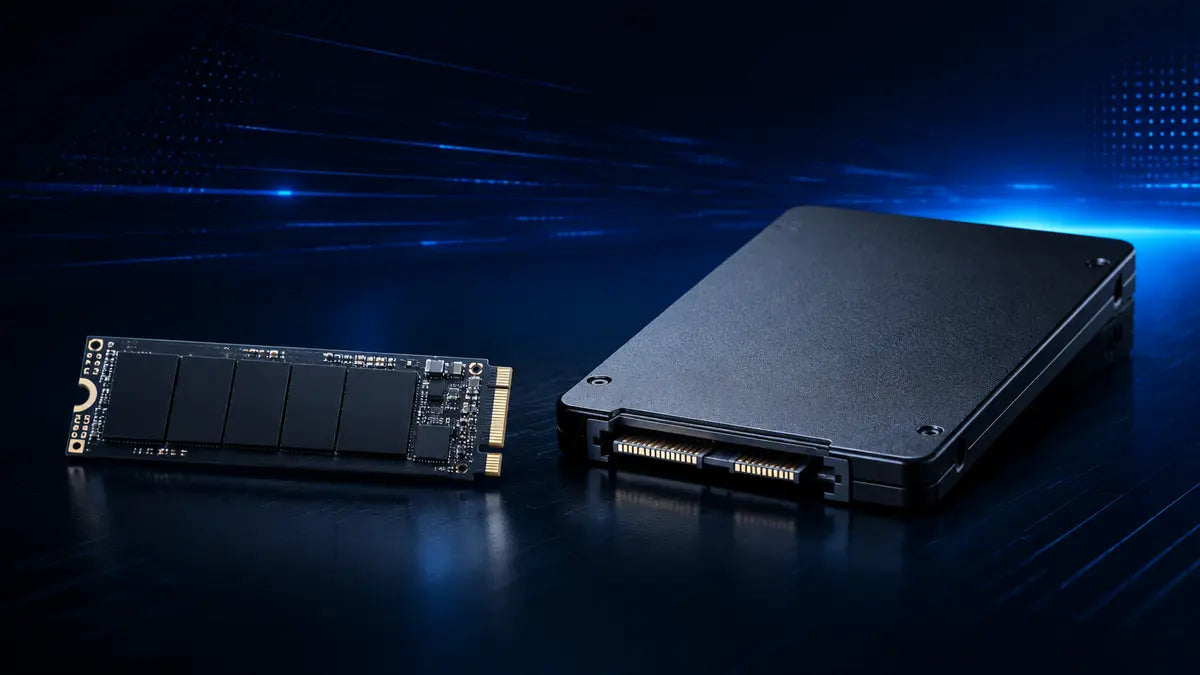
A modern SSD makes Windows, games and applications feel much more responsive, but the fastest specification is not automatically the best purchase. The right drive combines enough capacity, the correct interface and form factor, dependable endurance, suitable thermals and a price that leaves budget for the components that affect performance most.
M.2, NVMe, SATA and PCIe are not the same thing
M.2 describes a physical form factor and connector. NVMe is a storage protocol designed for PCIe. SATA is an older storage interface used by 2.5-inch SSDs and by some M.2 drives. PCIe identifies the high-speed connection used by NVMe devices. That means an M.2 drive is not automatically NVMe, and an M.2 socket may not support every M.2 drive type.
2.5-inch SATA SSD
Connects with SATA data and power cables. Excellent for inexpensive capacity and older systems.
M.2 SATA SSD
Uses the compact M.2 shape but still communicates through SATA. Compatibility varies by socket.
M.2 NVMe SSD
Uses PCIe and the NVMe protocol for much higher throughput and parallelism.
NVMe vs SATA SSD for gaming
| Feature | NVMe SSD | SATA SSD |
|---|---|---|
| Connection | PCIe through an M.2 or add-in interface | SATA through a 2.5-inch cable or compatible M.2 socket |
| Sequential performance | Much higher potential bandwidth | Limited by the SATA interface |
| Installation | Usually mounts directly on the motherboard | 2.5-inch models need data and power cables |
| Best role in 2026 | Primary drive for a new gaming or productivity PC | Cost-effective secondary storage or upgrade for older hardware |
| Game FPS | Usually little direct effect once assets are loaded | Usually little direct effect once assets are loaded |
An SSD mainly improves responsiveness and loading. It can reduce boot, install, transfer and load times, but it does not replace a stronger GPU or CPU for sustained frame rate.
How much SSD storage do you need in 2026?
| Capacity | Best for | Practical advice |
|---|---|---|
| 500 GB | Basic system or focused upgrade | Usable, but Windows, applications and a few large games can fill it quickly. |
| 1 TB | Mainstream PC with a managed game library | A practical starting point for a new system on a tighter budget. |
| 2 TB | Modern gaming PC and everyday productivity | A balanced target that leaves room for several large games and applications. |
| 4 TB+ | Large libraries, content creation and local project storage | Convenient, but compare cost per terabyte and backup needs. |
Leave free space for updates, temporary files, shader caches and the drive’s own background management. A nearly full SSD can be harder to manage and may perform less consistently during large writes.
PCIe bandwidthPCIe 3.0 vs 4.0 vs 5.0 SSDs
PCIe 4.0
Offers high performance, broad modern-platform support and a large selection of capacities and price points.
PCIe 5.0
Targets very high sequential speeds, but often costs more and may require stronger cooling.
PCIe is generally backward compatible: a newer drive can often operate in an older compatible slot at the slot’s lower maximum speed. Always verify the board manual because some sockets share lanes or support different generations.
Large video transfers and professional scratch work can benefit more from peak sequential speed than launching many games, where latency, random access and software design also matter.
Sequential speed is only one number
| Metric | What it describes | Where it matters |
|---|---|---|
| Sequential read/write | Large continuous transfers under ideal conditions. | Copying large files, media workflows and some installs. |
| Random performance | Access to many small files across the drive. | Operating-system responsiveness, applications and mixed workloads. |
| Latency | Delay before an operation begins or completes. | Responsiveness in frequent small operations. |
| Sustained write | Speed after fast cache space is exhausted. | Long captures, large exports and major file transfers. |
NAND type, DRAM, HMB and endurance
SSDs use a controller, NAND flash and firmware. Some include dedicated DRAM, while many NVMe drives use Host Memory Buffer to borrow a small amount of system memory for mapping data. Either design can work well when implemented properly, so judge the exact model and workload rather than treating one feature as a universal quality verdict.
TLC NAND
Common in higher-end consumer drives and often chosen for balanced sustained performance and endurance.
QLC NAND
Can deliver excellent capacity value, but sustained writes after cache may slow more on some models.
TBW rating
Terabytes written is a warranty endurance measure. Compare it with warranty length and realistic usage.
Motherboard compatibility and SSD cooling
High-performance NVMe drives can reduce speed when they become too hot. Proper contact with a heatsink and normal case airflow usually matter more than decorative cooling.
Drive organizationOne large SSD or separate system and game drives?
Simple and flexible
Easy to manage, uses fewer motherboard sockets and lets free capacity serve any application.
Workload separation
Useful for upgrades, backups, scratch files or moving an existing game library without reinstalling everything.
Multiple drives are not a substitute for backup. Important photos, documents and business files should exist in another independent location.
Eight-step decisionHow to choose an SSD
Check the motherboard manual
Identify supported interfaces, generations, lengths and shared lanes.
Choose capacity first
Leave room for the operating system, applications, games, updates and free space.
Pick the interface
Use NVMe for a new primary drive when compatible; use SATA where value or legacy support makes sense.
Match performance to the workload
Do not pay only for a peak sequential number you will rarely use.
Review sustained behavior
Check credible testing for cache size, long writes and thermals.
Compare endurance and warranty
Use the exact capacity’s TBW rating because it can vary within a product family.
Plan cooling
Confirm whether the motherboard includes the right M.2 heatsink.
Keep a backup plan
No SSD, regardless of price, eliminates the need for independent copies of important data.
Shop NVMe and SATA options by capacity, interface and performance tier.
View storage →Brand collectionSamsung storageCompare available Samsung solid-state storage options.
View Samsung →Brand collectionKingston storageExplore available Kingston storage and memory products.
View Kingston →Build guideInstall your PC componentsFollow the complete assembly, BIOS and first-boot process.
Read the build guide →SSD buying FAQ
Is NVMe noticeably faster than SATA for gaming?
NVMe offers much higher bandwidth and can improve some transfers and loading tasks, but the difference between good SSDs varies by game. It usually does not change sustained FPS.
Is 1 TB enough for a gaming PC?
It can be enough for a managed library. A 2 TB drive gives more flexibility for several large games, applications and future updates.
Can I install a PCIe 5.0 SSD in a PCIe 4.0 slot?
Often yes when the socket and keying are compatible, but the drive operates at the slot’s supported speed. Verify the motherboard manual.
Does every M.2 slot support NVMe?
No. M.2 is a physical format, and socket capabilities vary. Some support PCIe NVMe, some support SATA and some support both.
Does an NVMe SSD need a heatsink?
It depends on the drive, workload and airflow. High-performance models under sustained load benefit most. Follow the drive and motherboard guidance.
Should I clone my old drive or reinstall Windows?
Cloning is convenient when the existing installation is healthy. A clean installation can avoid old drivers and accumulated software. Back up important data before either process.
Buy the capacity you need, then the speed you can use
For most new gaming PCs, a well-reviewed NVMe drive with enough room is more valuable than a smaller flagship drive chosen only for its peak benchmark.